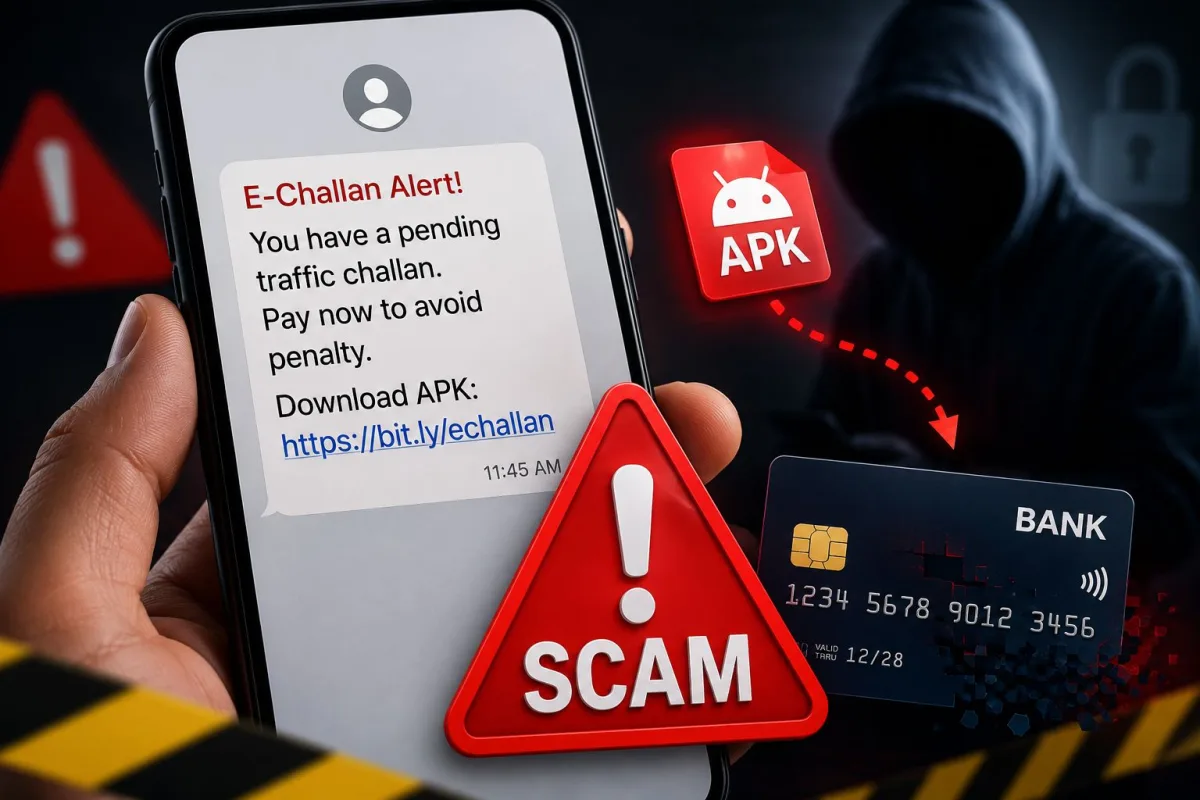
You get a text message saying your car has a pending traffic fine of Rs 500. The message threatens legal action if you do not pay immediately. You panic and click the link. Within ten minutes, your bank account is empty. This exact scenario recently cost a Delhi man Rs 2.5 lakh. Fake e-Challan SMS scams are currently one of the most destructive financial frauds targeting Indian internet users in 2026. The damage happens because these texts trick you into downloading malicious APK links that steal your bank details directly from your phone.
I see people fall for this every day. The scammers are getting smarter. They no longer rely on you typing your password into a fake website. They just need you to download an application. Once that file is on your phone, they control your text messages. They can see your OTPs, bypass your two-factor authentication, and authorize massive bank transfers while you think you are just paying a minor traffic ticket.
What are fake e-challan SMS scams?
An e-challan is a digital traffic ticket issued by the traffic police or the Regional Transport Office (RTO) in India. When you run a red light or overspeed, traffic cameras capture your license plate, and the system automatically sends a text message to your registered mobile number.
Scammers replicate this process to steal money. They send out millions of bulk SMS messages that look exactly like the real government alerts. Sometimes they even buy leaked vehicle registration databases on the dark web, meaning the text might include your actual car or bike number. The message usually says your vehicle has been fined for a traffic violation and provides a link to pay the penalty online.
The goal is to create a sense of urgency. Nobody wants a pending court case or a seized vehicle over a Rs 500 fine. This panic makes people click the link without checking the URL. You can read more about how scammers use fear in our latest scam alerts section.
How malicious apk links steal your bank details step by step
The method scammers use to empty your account is highly technical but happens entirely in the background. Here is exactly what happens when you interact with a fake e-challan message.
Step 1: The fake alert arrives
You receive an SMS from a random ten-digit number or a fake sender ID. The message includes a link that looks slightly official, like echallan-parivahan-update.in or rto-fine-pay.com. These are fake domains registered by criminals.
Step 2: The deceptive landing page
When you click the link, your phone browser opens a webpage that looks identical to the official Ministry of Road Transport and Highways portal. It has the national emblem, official fonts, and government logos. The site asks you to enter your vehicle number or chassis number.
Step 3: The hidden APK download
This is where the actual trap is set. Instead of taking you to a payment gateway like Razorpay or BillDesk, the website prompts you to download a file. The site might claim you need to download the "official RTO app" to view the photo proof of your traffic violation. The file you download ends in .apk. An APK is an Android Package Kit, the file format used to install software on Android phones outside of the Google Play Store.
Step 4: The permissions grab
You tap the downloaded APK file to install it. Your Android phone will show a warning saying "Install unknown apps" is dangerous. The scam website provides instructions on how to bypass this security setting. Once installed, the app asks for permissions. It specifically requests permission to read and send SMS messages.
Step 5: The silent bank drain
As soon as you grant SMS permissions, the scammers win. The malicious app runs silently in the background. The scammers use your leaked phone number to initiate password resets on your net banking or trigger UPI transactions. When your bank sends the One Time Password (OTP) to your phone, the fake e-challan app intercepts it. The app hides the text message from your screen and forwards the OTP directly to a server controlled by the hackers. They use the OTP to authorize the transaction. You only realize you have been robbed when you check your bank balance later.
Warning signs of a fake traffic fine text
You can easily tell the difference between a real government message and a scam if you know what to look for. Keep these warning signs in mind.
- The link does not end in gov.in. Every official Indian government portal uses the .gov.in domain. The real website for traffic fines is echallan.parivahan.gov.in.
- The message comes from a standard personal mobile number. Official traffic police alerts come from shortcodes like VD-ECHALN or similar verified sender IDs.
- The website asks you to download an application. The real Parivahan website allows you to pay fines directly through your web browser. It never forces you to download an APK file to process a payment.
- Your phone issues a security warning. If your device tells you an app is from an unknown source or contains malware, stop immediately.
How to protect yourself from e-challan fraud
Protecting your money requires a mix of skepticism and good device security habits. The most effective defense is to never click links in text messages, regardless of who appears to have sent them.
If you receive a message about a traffic fine, open your web browser manually and type in the official Parivahan URL. You can also download the official mParivahan app from the Google Play Store or Apple App Store. Enter your vehicle details there to verify if the fine is real.
You should also disable the ability to install apps from unknown sources on your Android device. Go to your phone settings, search for "Install unknown apps," and ensure this permission is turned off for your web browsers and file managers. If you want to learn more about securing your device, check our mobile security guides.
Finally, review the app permissions on your phone regularly. Go to your settings and look at which applications have access to your SMS messages. Remove this permission for any app that does not strictly need it, like calculators, games, or random utility tools. We review safe utility apps in our tech tools section if you need reliable alternatives.
Where to report fake challan scams
Time is critical if you have fallen for this scam. If you clicked the link, downloaded the APK, and granted permissions, the scammers have full access to your OTPs right now.
Immediately turn on Airplane Mode on your phone. This disconnects the device from the internet and cellular networks, preventing the malicious app from forwarding any more OTPs to the scammers.
Find another phone to call your bank immediately. Ask them to freeze your bank accounts, block your debit and credit cards, and disable your UPI ID. Tell them your device has been compromised by malware.
Next, you must report the crime to the authorities. The Indian Cyber Crime Coordination Centre operates a dedicated helpline for financial fraud. Call 1930 immediately to report the unauthorized transactions. You should also file a detailed complaint on the national cybercrime portal at cybercrime.gov.in. Provide them with the scam SMS, the sender's phone number, the fake website URL, and your bank statements showing the fraudulent transfers. CERT-In also issues regular advisories on these malware campaigns, which you can monitor to stay aware of new threats.
Do not turn your compromised phone back on normally until you have performed a complete factory reset. A factory reset will wipe all data, including the hidden malicious APK, restoring your phone to its original safe state.