Look, we all want a good deal. And with electric vehicles becoming the norm on Indian roads, battery replacement costs are a real worry for most owners. I get it. A new battery for an Ola S1 Pro can set you back over Rs 70,000. So when you get a message on WhatsApp claiming the government is offering a massive discount, your first instinct is to click. But don't do it. The fake Ola Electric battery subsidy WhatsApp APK scam 2026 is tearing through smartphones across the country, and it will empty your bank account faster than you can say OTP.
This isn't a simple phishing link. It's full-blown malware. Honestly, in my experience, people fall for this scam because the criminals behind it watch the news. The government recently announced plans to offer Rs 13,000 crore in aid to help local battery parts output. Scammers take a real government initiative and use it as bait. Let me break down exactly how this scam works. Knowing their playbook is the only way you stay safe.
A lot of folks assume they're too smart to fall for something like this. But these scams catch you off guard. You might be busy at work or managing the kids when the message pops up (which makes sense, actually). It feels relevant if you own an electric scooter. And the promise of saving tens of thousands of rupees is a massive motivator. That's exactly what the criminals behind the fake Ola Electric battery subsidy WhatsApp APK scam 2026 are counting on.
What exactly is the fake Ola Electric battery subsidy WhatsApp APK scam 2026?
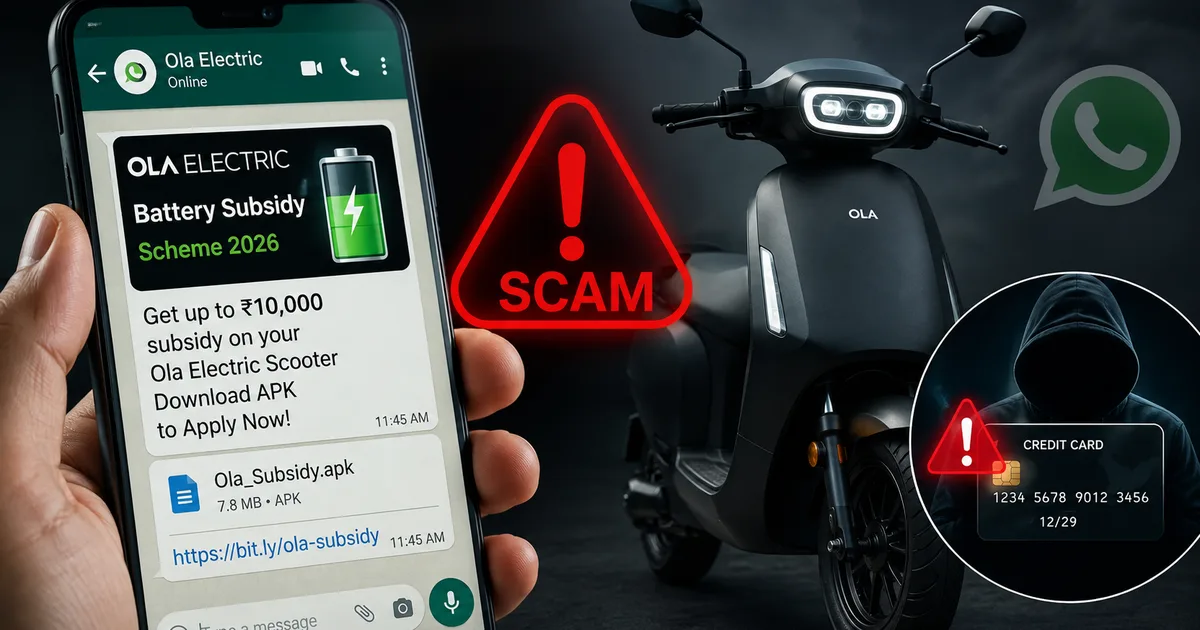
Basically, this scam relies on a bad APK file. You get a message on WhatsApp from an unknown number. The profile picture is usually the official Ola logo or the national emblem of India. The message says Ola Electric is offering heavily subsidized battery replacements for older scooters under a new government scheme. The numbers here are a bit fuzzy, but they always claim it's some official PLI subsidy.
The hook is always urgent. "Offer valid for the next 48 hours only" or "Limited slots available in your state." They tell you to download an app to register your vehicle details. The message includes a link to download an APK file directly. This skips the Google Play Store entirely. It's super sketchy.
Here's the deal. Ola Electric doesn't process subsidies through third-party APK files sent over WhatsApp. The government doesn't give out financial aid for EV batteries through random Android apps. If you want more details on similar tactics that criminals use to steal money, we regularly update our scam alerts and safety updates section.
Thing is, the scammers are exploiting the anxiety EV owners have about battery degradation. Lithium-ion batteries lose capacity over time. When your scooter's range drops, a cheap replacement feels like a lifeline. The criminals use this real pain point to trick you. They know exactly what they're doing.
How the battery replacement malware works step by step
Understanding the mechanics of this scam is a must. These criminals are running a very smooth operation. It isn't some amateur sitting in a basement. These are organized syndicates running structured campaigns.
Step 1: The initial contact
You receive the WhatsApp message. It looks professional. The language is formal. They often switch between English and Hindi to build trust. The scammers might mention recent news about the government's push for local battery manufacturing. They provide a link that looks something like "ola-battery-subsidy-gov.apk" or "ev-subsidy-india.apk". Sometimes they use shortened URLs to hide the file destination.
Step 2: Downloading the malicious file
When you click the link, your phone might warn you about installing apps from unknown sources. The scammers anticipate this. The WhatsApp message usually has instructions telling you to go to your settings and allow these installations. They claim it's a "beta version" of the app or a "direct government portal."
This is the exact same method we saw in the NHAI monthly toll pass scam that circulated a few months back. They walk you through disabling your phone's built-in defenses. It's a mess.
Step 3: Granting permissions
Once installed, the app asks for permissions. It wants access to your contacts and your SMS messages (annoying, I know). People usually just hit "Allow" without reading. And that's exactly where you lose the game. Giving an unverified app permission to read your SMS is like handing your house keys to a stranger.
Step 4: The financial drain
The app then presents a fake registration form. It asks for your Aadhaar number and vehicle registration details. Then it demands a small processing fee of maybe Rs 100 or Rs 500 via UPI. While you're trying to pay this small amount, the app is quietly forwarding every SMS you receive to the scammers. They start a password reset on your banking app or transfer funds. Because the malware intercepts the OTP, you never see the bank alert. Your money is just gone.
The scammers often wait until the middle of the night to drain the accounts. They want to make sure you're asleep so you don't notice any unusual activity until the morning.
Clear warning signs you should never ignore
I know it sounds complicated. But spotting these scams is actually quite simple if you know what to look for. Always keep these red flags in mind. The tactics rarely change.
- APK files on WhatsApp: No real company or government department will ever ask you to install an app via an APK file on WhatsApp. They will direct you to the official Google Play Store or Apple App Store. Period. There are no exceptions to this rule.
- Urgency and scarcity: Scammers always rush you. If a message tells you an offer is expiring today and you need to act immediately, take a step back. Genuine government subsidies don't expire in 24 hours via a random WhatsApp text.
- Strange app permissions: A battery replacement registration app doesn't need access to your SMS messages or phone calls. If an app asks to read your texts, delete it immediately. It's trying to steal your OTPs.
- Unsolicited government offers: Be highly suspicious of any message claiming you've been randomly selected for a government subsidy. Scammers use government schemes as bait all the time, much like the fake Mukhyamantri Ladli Behna Yojana registration app that targeted women recently.
- Requests for small processing fees: Subsidies are meant to give you money or discounts. They shouldn't take it. Asking for a Rs 50 or Rs 100 registration fee is a classic trick to get you to enter your UPI PIN or card details into their fake payment gateway.
How to protect your bank account from APK malware
If you ask me, prevention is much better than trying to recover stolen money. The banking system in India moves fast. Once funds are transferred, getting them back is a massive headache. The recovery rate for cyber fraud is painfully low. So your best defense is just not falling for it in the first place.
First, never disable the security setting on your Android phone that prevents installing apps from unknown sources. That setting is there for a reason. Leave it on. If an app isn't on the Play Store, you don't need it.
Second, if you need to check on subsidies or battery replacements, open your browser. Go directly to the official Ola Electric website or use the official Ola app you downloaded from the Play Store. Don't click links in unsolicited messages. Type the URL yourself.
Third, keep your banking apps updated and enable biometric authentication. A fingerprint lock is an extra layer of security that malware struggles to bypass. Even if they get your password, they can't replicate your fingerprint.
And finally, talk to your parents and older relatives. They're often the prime targets for these scams because they might not be familiar with how APK files work. A five-minute conversation over dinner could save them their life savings.
"Cybercriminals are increasingly using relevant news events, such as government PLI schemes for EV batteries, to create highly convincing phishing campaigns. The distribution of malware via APK files remains one of the most significant threats to mobile banking users in India."
What to do if you already installed the fake app
If you're reading this and realize you've already installed the app, you need to act right now. Don't wait. Every second counts when malware is on your phone.
Turn on airplane mode immediately. This cuts off the internet connection. It stops the app from sending any more of your data or OTPs to the scammers. Basically, it stops the bleeding.
Next, uninstall the app from your phone's settings. Don't just delete the icon from your home screen. Go to Settings and find the malicious application to hit uninstall. I'm not sure exactly why, but sometimes the app refuses to uninstall. If that happens, you might need to boot your phone into Safe Mode or perform a full factory reset.
After that, use another device to change your UPI PIN and internet banking passwords. Call your bank's customer care number and tell them your phone was compromised. Ask them to freeze your account temporarily or block any outgoing transactions.
Where to report the fraud
Reporting the scam is a big deal, even if you didn't lose any money. Your report helps authorities take down the malicious servers. It also prevents others from falling victim.
If you've lost money, immediately call the national cybercrime helpline at 1930. This helpline works directly with banks to freeze fraudulent transfers. But you have to call them as quickly as possible. The golden hour for recovering funds is incredibly short.
You should also file a detailed complaint on the official portal at cybercrime.gov.in. Provide screenshots of the WhatsApp messages and any bank transaction details if money was deducted. The Indian Computer Emergency Response Team (CERT-In) tracks these malware campaigns. Reporting helps them issue public advisories and track down the syndicates.
The transition to electric vehicles is a good thing for India. But it brings new challenges. We have to be smart about how we manage our digital lives. Don't let a promise of a cheap battery cost you your hard-earned money. Just stay vigilant and never let a stranger into your phone.